MRT Tool V6.0.0.0 FRP Unlock Tool Free Download 2025 – 1 Year Free License
MRT Tool V6.0.0.0 FRP Unlock Tool Free Download 2025 – 1 Year Free License
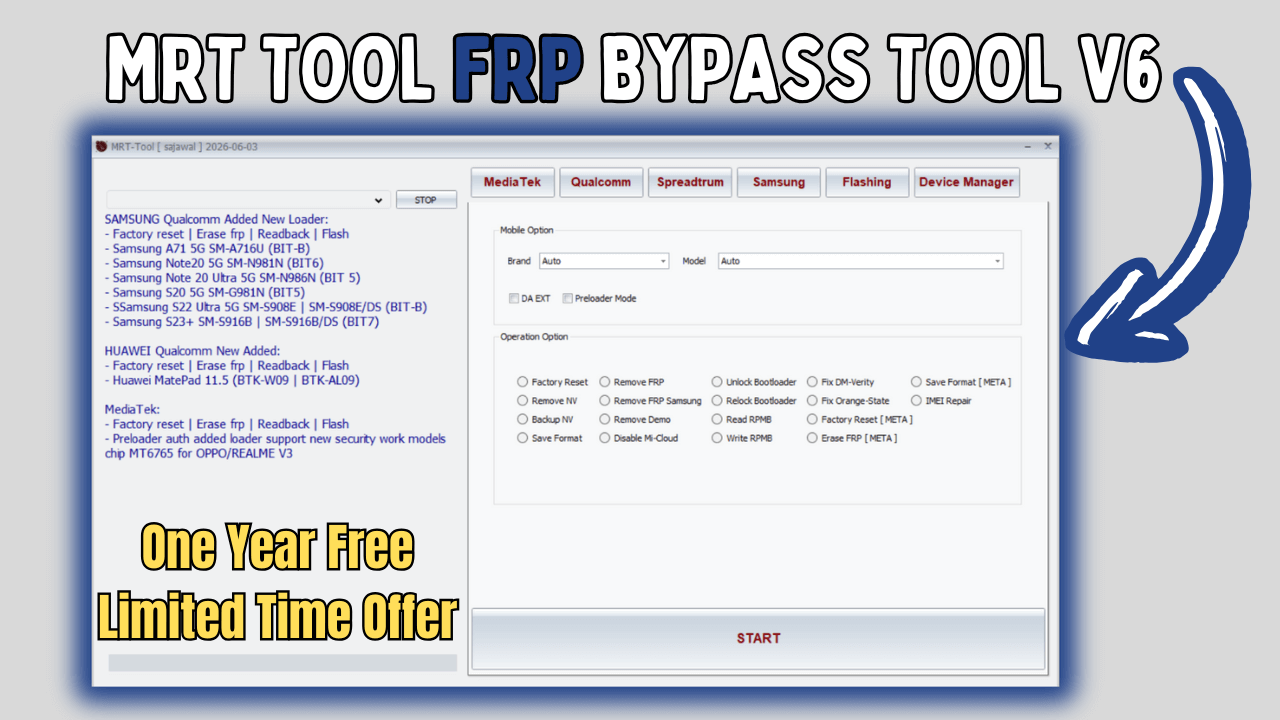
MRT Tool V6.0.0 has been released. MRT Tool is a powerful mobile phone repair tool that works with smartphones. It allows you to flash, unlock, factory reset, reset FRP, remove iCloud lock, bypass passcode lock, bypass Hello screen lock, and remove Mi Account from a variety of smartphone brands. This tool is completely free for all members, offering advanced features for flashing, unlocking, and device servicing for 1 complete year. This FRP bypass tool is the best way to flash, unlock, and repair your Xiaomi, Vivo, Meizu, Oppo, and Huawei devices. The tool is now officially released.
📖 Table of Contents
🚀 New Update 6.0.0 – Supported Models
Samsung Qualcomm – New Loader (Factory reset, Erase FRP, Readback, Flash)
- Samsung A71 5G SM-A716U (BIT-B)
- Samsung Note20 5G SM-N981N (BIT6)
- Samsung Note 20 Ultra 5G SM-N986N (BIT 5)
- Samsung S20 5G SM-G981N (BIT5)
- Samsung S22 Ultra 5G SM-S908E | SM-S908E/DS (BIT-B)
- Samsung S23+ SM-S916B | SM-S916B/DS (BIT7)
Huawei Qualcomm – New Added (Factory reset, Erase FRP, Readback, Flash)
- Huawei MatePad 11.5 (BTK-W09 | BTK-AL09)
MediaTek
- Factory reset, Erase FRP, Readback, Flash – Preloader auth added loader support new security work models chip MT6765 for OPPO/REALME V3
📌 Also Read: Best Flash Tool V1.5 Latest Version Free Download 2025
🔧 Tool Features
- Remove FRP Qualcomm CPU BIG MODEL 2025
- Remove FRP Samsung MediaTek CPU
- Remove FRP Samsung By Test Mode (*#0*#)
- Unlock / Relock Bootloader
- Disable Mi-Cloud
MediaTek Operations
- Factory Reset, Remove FRP, Unlock Bootloader, Fix DM-Verity
- Safe Format (META), Remove NV, Backup NV
- Remove FRP Samsung, Relock Bootloader, Fix Orange-State
- IMEI Repair, Remove Demo, Read/Write RPMB
- Disable Mi-Cloud, Factory Reset (META), Erase FRP (META)
Qualcomm Operations
- Factory Reset, Reset EFS, Reset FRP, Unlock Bootloader
- (DISTRI) Disable Mi Cloud, (TAM) Unlock Mi Cloud
Spreadtrum (Unisoc) Operations
- Read GPT, Factory Reset + FRP, Remove FRP, Flash
Samsung Operations
- Download Mode (Flash / Unlock), Factory Reset, Fix Soft Brick
- Remove FRP MediaTek, Reading Info (ADB), Remove Samsung Account (ADB)
- Enable Debug (MTP), Remove FRP (ADB), Reboot to Download/Recovery Mode (ADB/MTP)
- Remove FRP New (ADB), Remove Knox (ADB), Reading Info (MTP)
📥 How To Use This Tool
- First, download the ZIP file from the link below.
- Register for 1 year free – contact @Vibnectar on Telegram (see below).
- Unzip/Extract the ZIP file with password:
sbmobilelab - Disable antivirus temporarily (false positives may occur).
- Open the destination folder and run the setup (MRT Tool).
- Install all required drivers and connect the phone.
- Enjoy!
📦 Download & File Information
File Name: MRT Tool V6.0.0
Type: .rar
Compatible: Windows XP, 7, 8/8.1, 10, 11 (both 32/64 bit)
Password WinRAR: sbmobilelab
📱 Register for 1 year free license:
Contact @Vibnectar on Telegram – mention “MRT Tool 2025” to receive registration instructions.
❓ Frequently Asked Questions
Q: Is MRT Tool V6.0.0 completely free?
A: Yes, the tool itself is free. You need to register for a 1‑year free license via Telegram (no payment).
Q: Which brands are supported?
A: Samsung, Xiaomi, Huawei, Oppo, Vivo, Meizu, Realme, and more – covering MediaTek, Qualcomm, and Spreadtrum chipsets.
Q: Does it work on Android 14/15?
A: Yes, the latest update includes support for Android 14/15 FRP removal.
Q: What is the password for the RAR file?
A: sbmobilelab (all lowercase).
Q: Why disable antivirus?
A: Some antivirus programs may flag the patched loader as a false positive; temporarily disable during installation.
🔧 Professional Mobile Repair Tool – Tested & Verified 2025
📌 Find more FRP bypass tools on our All Tools page.

Comments